

| Created | AUG.11.2026 |
| Revised | AUG.11.2026 |
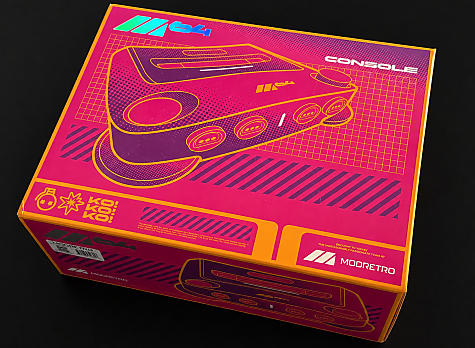
The ModRetro M64 is out, finally – I guess a lot of people out there were expecting they would beat Analogue to it and release the M64 before or right after Christmas, but it didn’t happen and we were left waiting a bit longer – but July 28th, 2026 the M64 finally was available for ordering, along with 4 M64 (N64) games, a mixed bag of re-releases, new and somewhat new.
I put my order in at July 28th and had to wait a little while, as I am located in Europe, the system had to do a bit of travelling. I have to say though that the packing and shipping of my order was insanely fast, I received confirmation of the order shipping that same night, and some 7 days later, having travelled around 9000 kilometers (5590 miles), the order was delivered to my door, well done to ModRetro, FedEx and PostNord.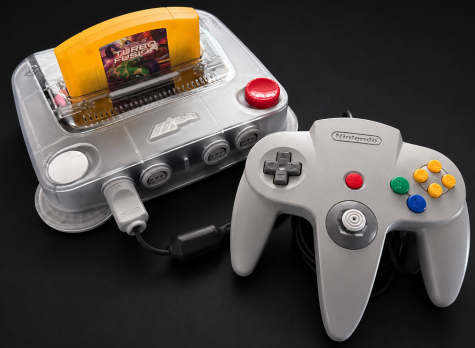
In case you’re new to the “M64”, it’s a Nintendo64 compatible console created by the makers of the Chromatic Game Boy Color “clone”. ModRetro is a US “retro gaming hardware company” who specializes in building modern versions of classic gaming hardware, that works with original and after market game cartridges. It was founded by Torin Herndon and Palmer Luckey, the latter of Oculus and Anduril fame.
When I say Nintendo64 compatible I mean that this is a system trying to present itself as a Nintendo64. It uses something called an N64 FPGA core, a recreation of the Nintendo 64 system and designed to run on an FPGA (Field-Programmable Gate Array) - or in other words, a recreation of the Nintendo64 that runs inside an FPGA, it’s not really emulation – the FPGA is “being told that it is an N64” (ugh, I hope I got that right).
Making a 100% accurate N64 FPGA core has been in the works for a very long time, the struggle has been tough due to the complexity of the N64. We saw the first signs of the struggle back in 2019 where Hyperkin showed off their very buggy N64 clone, a device that never made it to market. The latest and most successful attempts have been the Analogue3D and now the M64.
So here we are, the M64 is out, I’ve now had a chance to sit down an gather my first thoughts about the system. I will not be doing a comparison to the Analogue3D, mainly because I do not have an Analogue3D, but also because I simply do not care about such a comparison, this is all about what the M64 delivers at release, the good and the bad.
Also, I did not get the M64 Pro Controller as I had to cut cost somewhere, getting an M64 and 2 games delivered to Europe was not cheap, including tax, shipping and so on it was €384.62 – roughly $443.11 with the current exchange rate and even including the mailing subscription discount of €26.75 ($30). I have heard a lot of good thing about the controller, but coming in at €96.95 ($111.69) but simply had to pass – and we will come back to why that might be a good thing at the time of writing.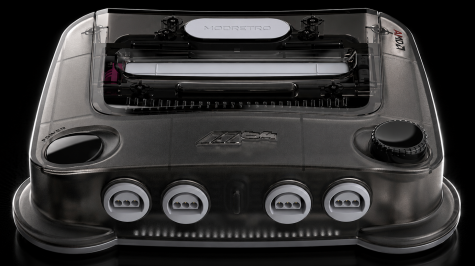
When unpacking the M64 you are greeted with a glossy, colourful outer box, followed by a black box inside containing the M64 itself in one of the 4 color variant available at the time of writing – a GameStop exclusive “smoke black” edition is set to be released on August 21st, retailing for $229.99, and I have to be honest that this might be the coolest looking one in my opinion.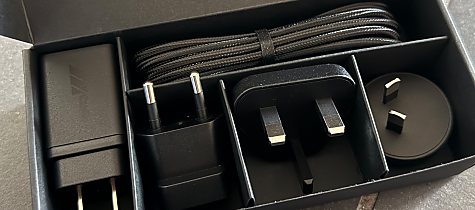
Anyway, inside the inner box, along with the console you will find a USB-C cord and a power brick, packaged with a set of adapters to make the power brick fit any power socket in the world. Twist the end connector off, replace it with the one you need and you are good to go. ModRetro strongly advises against using any other power adapter than the original one, which might have ModRetro molded into the plastic, but is produced by Channel Well Technology. If your power brick at some point gives up, or is lost, you just need to find one that matches the specs of the “original” and you should be good – but keep an eye on the output, it has to match.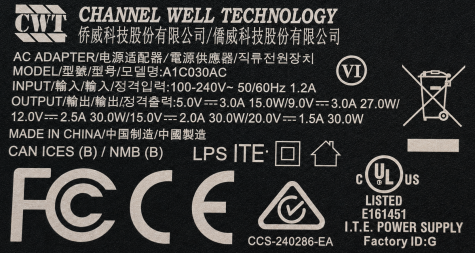
That’s it, a console, power brick and a USB-C cable to go between the power brick and the console is all that is in the box, no HDMI cable, no quick guide or anything other than they encourage you to update the systems firmware as the very first thing. Most might say that an HDMI cable isn’t a problem, most have one lying around – but those who doesn’t are left to go shopping for one, not a deal breaker, but if you wanted to present a ready to use experience, this is not the way.
Regarding the quick guide, sure it may soon be out of date, so the best way is probably to visit the ModRetro website. The console’s GUI is pretty straight forward, I had my console connected to WiFi pretty quick and an update from 1.18.3 (I believe it was) to 1.23.0 was chugging along, I honestly didn’t time it – sure it took a while, but not a serious issue.
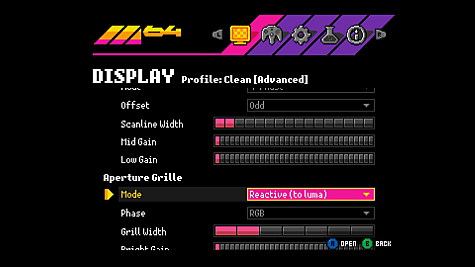
The console GUI, or OSD “on screen display”, has a few settings to look at and this is probably where I got a bit lost. First one is display, here you can add scanlines and make games look CRT’ish. I am not really a fan of such a scan line feature, but there’s a ton of settings to mess around, if you are not dizzy when starting you will be when you are done messing with scanlines modes, offsets, mid gain, low gain, aperture grille mode – I don’t know what most of it is honestly and decided to just skip it – the default scanline profiles I highly disliked and went for the “clean” output without scanlines.
In the menu you can also pair controllers, but as I am using my original N64 controller from way back, because I am too cheap to buy a ModRetro Pro Controller, no pairing was necessary. Next up is the WiFi and more – more being the option to power off the console from the menu, I don’t know what the idea was? In case the power button doesn’t work? But then how did you get there in the first place? Oh well…
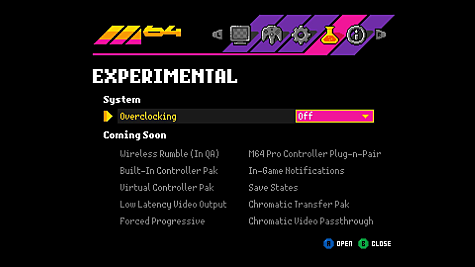
Finally there’s a section about overclocking and I have heard that this was the talk of the town and why the M64 was delayed, because the M64 was lacking overclocking when the Analogue3D had it. My issue here is that I have no idea if I need overclocking, what does it do for me? Do I need Super, Ultra, Extreme, Insane or simply just keep it at off. So overclocking makes the M64 run faster, which could/should reduce frame rate drops (slowdowns) in game. At this time I have no need to run games faster, I am old and slow, so the original setting probably fits me just right – also the overclocking could also break some games, or even make some games refuse to run.
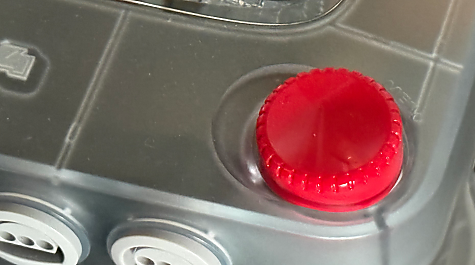
The M64 console itself is looking awesome, although it seems a little like something Fisher Price could have released with that big “knob” on the right side of the console, that of course has to be red on the clear edition I bought, sticking out as a sore thumb – I like that it takes me to the menu, which by the way can be done in-game too by pressing Z and Start but does not always work. I do not like the aesthetics of the “knob” though and while we are at it, one of the first things I noticed was the lack of a reset button. I read somewhere that a quick push on the power button would reset the console, quick start guide anyone?
With firmware 1.23.0 that is not happening - I learned though that if you push the power button quick twice, it acts like a reboot, but it that supposed to be the way to do a reset? It may not matter to most, but if you use an N64 flash cartridge instead of an original N64 or M64 cartridge, a reset button would have been nice – hey even the original N64 had one.
So with the first of my complaints out of the way, let’s move on. So the M64 plays a lot of games and plays them well. But as mentioned, making a 100% compatible N64 core is tough, and at the time of writing, the M64 is not yet fully compatible with the entire official N64 library – 16 games are known to cause problems while 277 are reported to work. That is still quite impressive and most of the current problems are minimal, like Namco Museum 64 has a grey bar at one side of the screen but the game is fully playable.
I decided to try out a few oddities out, first something that most people will probably the using, first up is the different “flash carts” I have available to me , let’s give them a spin.
SummerCart64 (Aliexpress edition) – Occational problems loading games, the SC64 would be throwing an “error occurred during save loading”, while other games load just fine. Also, the 64DD part does not work, the games fail to load, loading stalls at 100% and the result is the same on both SC64 carts. In general though, the M64 seems to be compatible with the SummerCart64.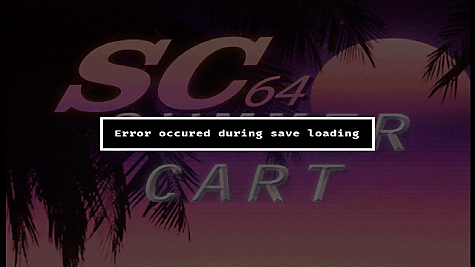
64Drive - The M64 is not compatible with the 64Drive it seems, and it’s probably is the most accurate and best quality N64 flash cart made to date, and it’s still my preferred cart to use. The 64Drive has problems loading a wide range of files when used with the M64 and even refuses to load my 2 16GB Compact Flash carts that I have used for years on my original N64. When testing the 64Drive with the M64 I was also presented with a couple of 64Drive “easter eggs” that I have never seen before.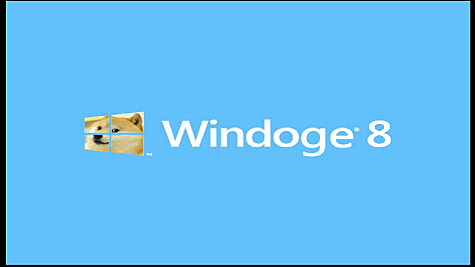
Everdrive, pending as I seem to have misplaced my Everdrive64, uhh oh ooops.
Super64 (Aliexpress Everdrive clone, firmware 1.16) – loads up the menu, I managed to load Airboarder64 once and it crashed during the intro when I tried to pull up the M64 menu. After that the cart would refuse to load a lot of games, even Airboarder64, throwing a “Rom load error: 147”. The cart will still load up the menu, I was able to get a few other games running, while others would load but throw a black screen. I would say that the M64is far from compatible with the Super64, it’s more miss than hit when trying to load a game.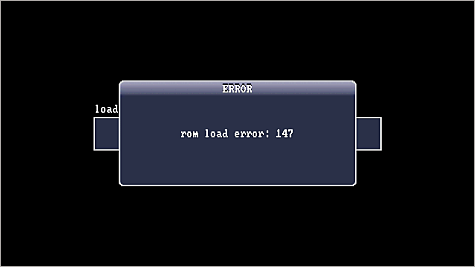
Next up I decided to test some of the N64 multicarts you can/could purchase off ebay, neither of the two I have would run, instead they would just throw a black screen. Single game “Ali Express” carts, like Zelda64 Dawn & Dusk run just fine.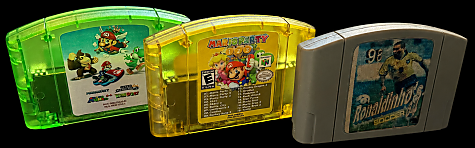
If you happen to have some N64 pirate carts from back in the day, those that did not feature a CIC “lockout” chip inside and would require an adapter to work, you seem to be in luck, because the M64 seems to play them just fine – I tried Human Grand Prix, Mace the Dark Age and Ronaldinho Soccer 64, some old N64 pirate carts received from Brazil way back.
Homebrew and emulators. Now we are entering territory that I think ModRetro hasn’t spoken much about. I decided to try out a few emulators first.
GB64, a Game Boy and Game Boy Color emulator that has awesome compatibility and overall just runs really good. Well, not on the M64, because while games loads and runs, it seems like the controller isn’t recognized – so you can load a game, but not play it.
Neon64, the infamous and awesome NES emulator for the Nintendo64 seems to work just fine, no issues encountered. If you’d like to play some NES classics on your M64, this is well worth a try, impressive work done here.
PCEngine, a step back in time to Presense of Mind, a competition held by a website called Dextrose back in the day. One of the entries was a PCEngine emulator, with the Galaga ROM included and as far as I remember you could not change it – but the emulator works just fine.
Sodium64, a new relatively new SNES emulator for the N64, witten in assembly. This one just doesn’t work, which is quite sad. The emulator loads roms and runs, but the graphics are all messed up, rendering the game unplayable.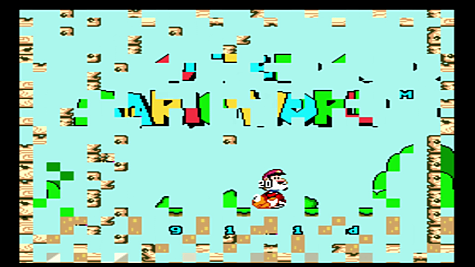
Homebrew wise there’s not a whole lot to say, the M64 ran what I threw at it, even my favourite N64 demo ever, Nacho64 ran without any noticeable issues. The biggest problem is really the SNES emulator that only runs with garbled graphics in games and the Game Boy emulator where controller input does not work – one can only hope that ModRetro gets these fixed in a future firmware.
Now on to the more serious issues and before you yell at the screen “it’s coming!” then please hear me out, because launching the console without this feature and launching a super expensive pro controller as well, this feature should probably have been prioritized a bit more than overclocking. I am talking about a virtual controller pak. Many N64 games require a small memory pack that would slot into the controller to save your game, some games even take up an entire controller pak for saving.
While controller paks might be easy to find on ebay, or Ali Express for that matter, you are out of luck if you’ve bought the ModRetro Pro controller, as it does not have a controller pak port at the time of writing, meaning you have no way of saving in a lot of games – this to me is a huge issue and needs to be addressed as soon as possible. If you, like me, however is using an old original controller or an after market one with a controller pak port, you’re good – if you have enough controller pak lying around to feed your need – which is why something like the M64, in 2026, should include some sort of controller pak manager which would let you backup controller paks to the microSD card in the M64. Yes, I know it’s on the list, virtual controller paks, but why it’s not ready at launch is beyond me – unless the product at the end of the day was a little rushed?
While we are at it, the possibility to backup saves from cartridges that feature SRAM, a type of save that needs a battery to keep their saves. While the latter is a nice to have, the virtual controller pak had to have been a feature available at launch.
Don’t get me wrong here, I am not on a spree to just bash the M64, mind you this was the console I picked over the Analogue3D, but when it then delivers a muddy picture, a menu albeit great looking and somewhat easy to use, that can not be said about the display settings, all the weird namings already mentioned and opening up the advanced section is enough to make anyones head spin. I tried to mess around with these settings but to my eye nothing really happned other than maybe just making it worse.
So my final thought of the M64 is that there sure is room for improvement, it seems rushed which is strange to me, when you’re releasing your product some 10 months after the competition, why not wait a little longer and release something that is actually a bit more polished – why did it have to be now.
So I don’t like the big “red” knob on my console, but other than that the design is actually okay, I would have preferred an actual reset button and then a smaller button somewhere else on the console to enter the menu, if Z + Start does not work, I will never be using the big knob to maneuver around in the menu, and to me it’s unfortunate that it’s such an eyesore – that’s an opinion though and if you are of a different opinion, let’s agree to disagree.
What I like about ModRetro is the energy surrounding their products, the fact that they go the full mile and include their product range, the N64 deserves some love and it can be both in the shape of newly developed games, but also games that we maybe never saw in Europe, or the US for that matter.
At the time of writing, when finishing this “short” review, the firmware for the M64 was at 1.23.0, one can only hope that the next version is “coming soon” as it should feature a virtual controller pak option – but besides that ModRetro needs to step it up if they want to catch up to the competion I think, their FPGA core needs some work, as my review also showed. One final mention, the M64 gets really hot on the underside and I am wondering if that could become an issue down the road, but I guess we will have to wait and see.
The Good
✓ Strong official N64 compatibility
The vast majority of the official N64 library works well, with only a relatively small number of known compatibility issues.
✓ Solid build quality
The M64 feels well made and doesn't come across as cheap or flimsy.
✓ Simple setup and firmware updates
Getting connected to Wi-Fi and updating the console is straightforward.
✓ Generally easy to use
The main interface is clean and easy to navigate, although the display options could definitely be simpler.
✓ Competitive price
Compared with its main competition, the M64 comes in at a more attractive price.
The Not So Good
✗ No virtual Controller Pak at launch
This is the biggest omission. It is particularly problematic for the M64 Pro Controller, which has no physical Controller Pak slot.
✗ Compatibility outside the official library needs work
Flash cartridges, multicarts, homebrew and N64-based emulators are much more hit-and-miss than original cartridges.
✗ Image quality needs improvement
The default video output looks somewhat soft or blurry, and the large number of display settings don't make finding the right setup particularly easy.
✗ Feels unfinished in places
Missing features, compatibility problems and some confusing settings make the launch firmware feel less polished than it should.
✗ That menu knob...
Useful? Yes. Attractive? That's debatable. The large red knob on the clear model certainly isn't subtle.
✗ No dedicated reset button
Resetting the console isn't as obvious or convenient as it was on the original N64.


